
Matomo Tracker Extension for Magento 2
Extendware Matomo Tracker provides server-side Matomo ecommerce tracking for Magento 2 via the official Matomo PHP Tracker SDK. All tracking calls are made directly from the PHP backend — no JavaScript required.
Interested in Extension Installation Service?
Visit our installation service page https://www.extendware.com/magento-extension-installation-service.html for more information.
Support
Got questions? Feel free to contact us! Support Form.
Installation Procedure
Type 1: Zip file
Download your extension package from the Download page after purchasing the extension.
Open the extension ZIP file you downloaded and extract it to a directory on your computer using a tool like WinRar, WinZIP or similar.
Upload the extracted files to the
app/code/Extendwaredirectory in your Magento installation, maintaining the folder structure. If updating, overwrite the existing files.Connect via SSH and run the following commands (make sure to run them as the user who owns the Magento files!):
php bin/magento module:enable --clear-static-content Extendware_MatomoTracker

php bin/magento setup:upgrade

php bin/magento setup:di:compile

php bin/magento setup:static-content:deploy
Type 2: Via Composer (recommended)
You can freely install, update, and remove Magento 2 extensions using Composer.
Please request your private access first via Support Form.
Add the custom repository to the composer.json:
composer config repositories.private-packagist composer https://extendware.repo.packagist.com/your-company-name/
Setup authentication:
composer config --auth http-basic.extendware.repo.packagist.com token YOUR-PRIVATE-TOKEN
Install the module:
composer require extendware/module-matomotracker
Run the following commands:
php bin/magento module:enable --clear-static-content Extendware_MatomoTracker

php bin/magento setup:upgrade

php bin/magento setup:di:compile

php bin/magento setup:static-content:deploy
User Guide
Prerequisites
A running Matomo instance accessible from your Magento server.
A Matomo Site ID and Auth Token (found under Matomo → Settings → Personal → Security).
Configuration
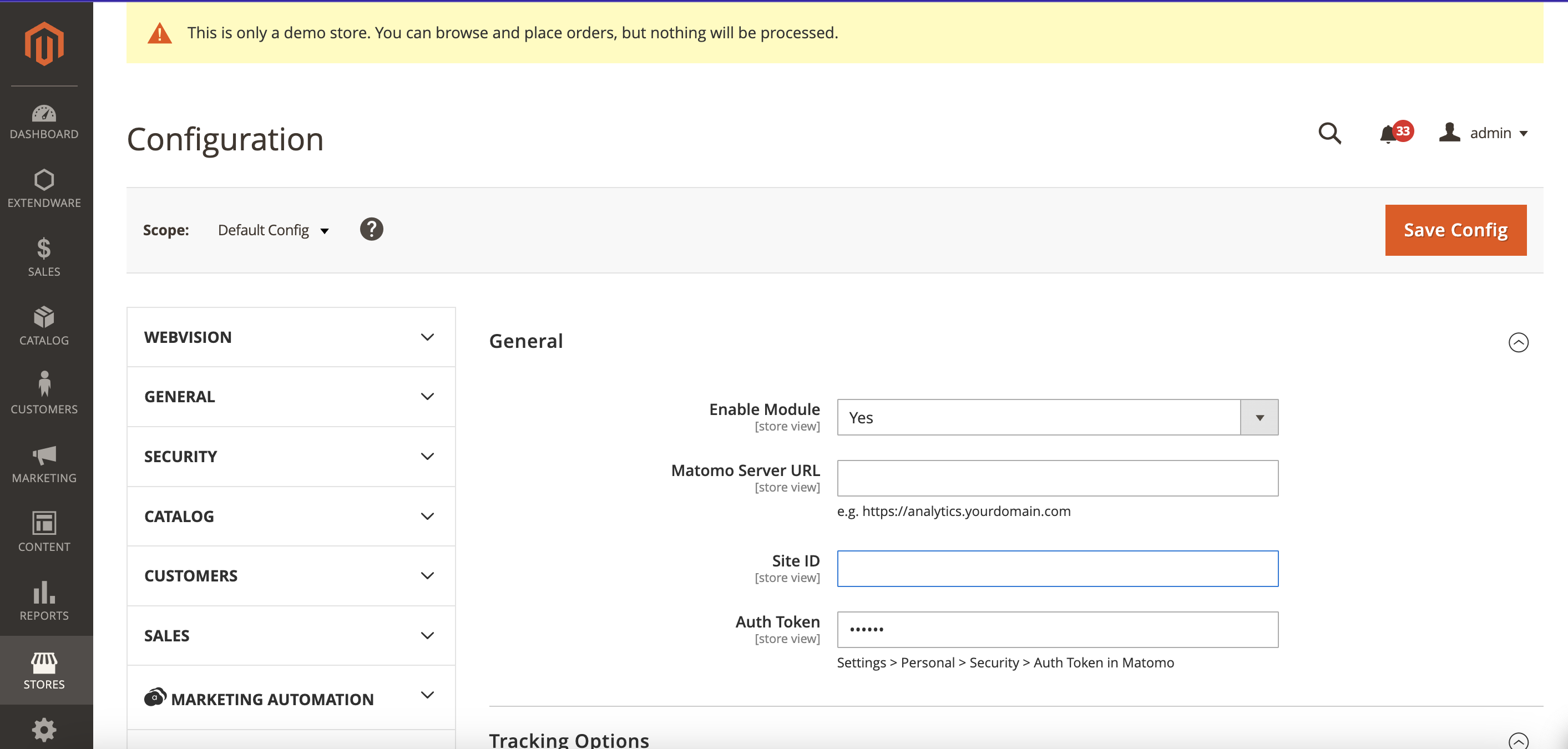
To configure the extension go to Dashboard → Stores → Configuration → Extendware → Matomo Tracker.
Configuration Overview — General
Enable Module — Select Yes to enable tracking.
Matomo Server URL — The base URL of your Matomo instance, e.g. https://analytics.yourdomain.com.
Site ID — The numeric site ID assigned to your store in Matomo.
Auth Token — The 32-character authentication token from Matomo. Stored encrypted.
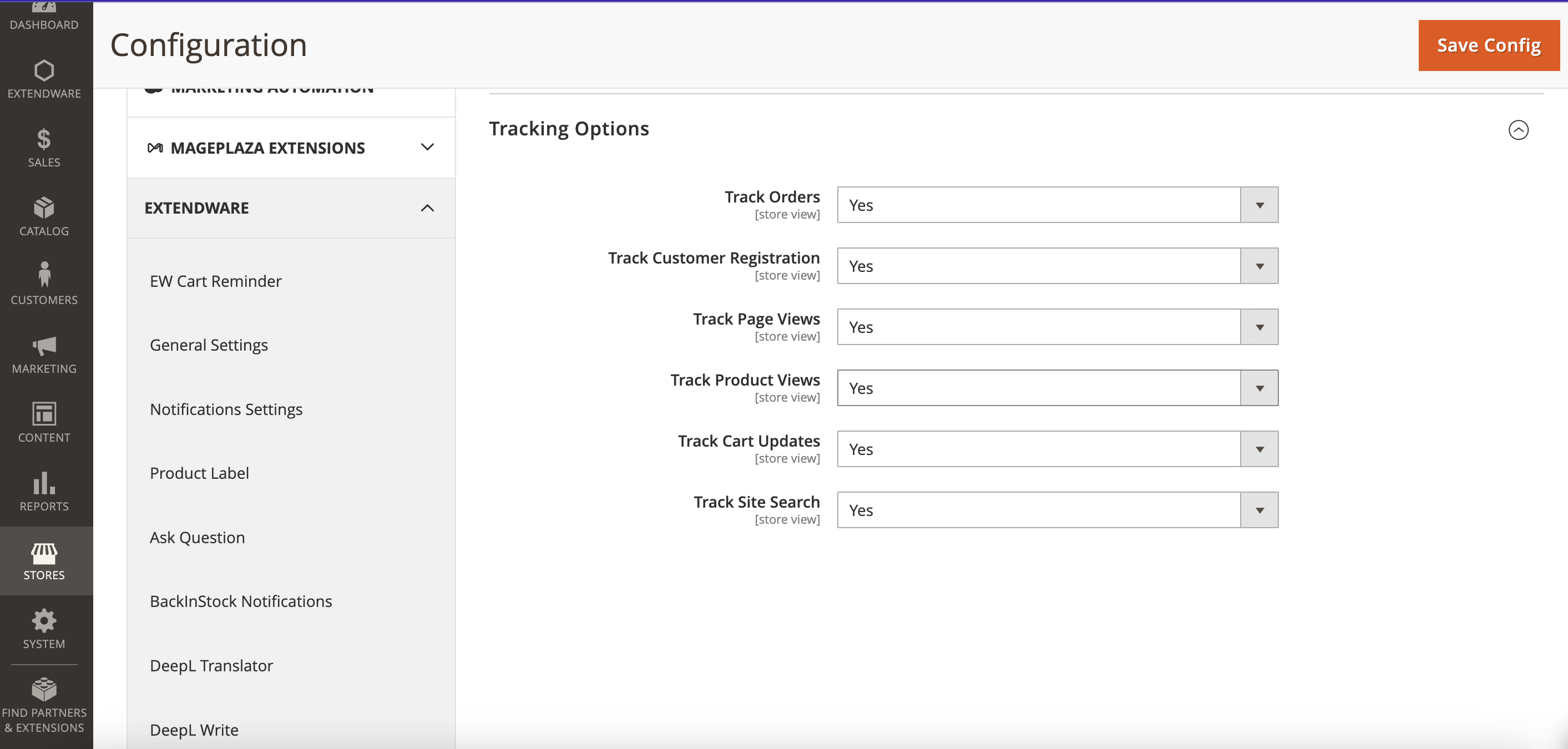
Configuration Overview — Tracking Options
Track Orders — Tracks completed orders as ecommerce conversions in Matomo.
Track Customer Registration — Tracks new account creation as a custom event.
Track Page Views — Tracks all standard HTML page requests.
Track Product Views — Tracks product detail pages with full ecommerce context, linking views to purchases in Matomo’s product reports.
Track Cart Updates — Tracks add, remove, and quantity changes in the cart.
Track Site Search — Tracks search queries and result counts, visible in Matomo’s Site Search report.
Changelog
All notable changes to this project will be documented here.
[1.0.0]
Added
Initial release
Server-side order, cart, page view, product view, site search and customer registration tracking
Per-feature on/off toggles in admin configuration
Async message queue support
Visitor ID resolved from Magento session (SHA-256 hashed)